Apple made a clever user interface change with iPhone 2.0:
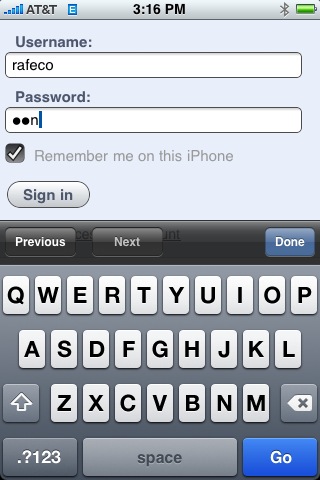
When you enter text into a password field, it briefly displays the character you just entered. After a few seconds, it changes the character into the mask, but it gives you some visible feedback that you’re entering the characters you think you’re entering. (I always had problems entering passwords correctly until this feature was added.)
It’s an acknowledgement that entering text using a virtual keyboard isn’t foolproof, and it provides a good compromise between masking passwords so people can’t see your password over your shoulder and enabling users to avoid typos when entering them.
By the way, this screen shot was taken using the new screen capture feature in iPhone 2.0.
Update: Commenters have noted that other phone makers have been doing it this way for years. I guess what this really means is that the iPhone is the first phone that I’ve ever used to enter a password.
July 13, 2008 at 5:15 pm
This has been the standard password input field behavior on Nokia phone web browsers for years — but interestingly enough, not on the 770 tablet.
July 13, 2008 at 7:23 pm
On my N800 (with the OS2008 version of the OS), I get the last-char-for-a-second thing with password prompters for applications, but don’t get it with password fields in the web browser.
July 14, 2008 at 2:07 am
Has been the same on Sony Ericsson phones for years too…
July 17, 2008 at 10:12 am
Unngh, I absolutely HATE this feature, and I am desperately looking for a way to shut it off. It’s a huge security issue, IMO.
I don’t really care if it is helpful for others, I just want to shut it off.
July 9, 2009 at 2:48 pm
How is this a security issue? If the user can see the last character on your iPhone screen, then they could see you type the character just as easily. It really doesn’t matter if the password is masked. If security is that important to you, I’d really suggest you not type passwords into a website form field.
I think it’s the illusion of security you are after and not security at all.